Skip to content
Menu
Switch to French
Server presentation

Server presentation

Your place in the presentation

Server presentation

Gurgarath Resurgence

Opens December 11

01

The innovative server

Gurgarath does not fit easily into the usual categories. If we had to give it a label, it would probably be Middle-School. We kept the timeless mechanics that players enjoy and that work, pushing them as far as possible, and rebuilt those that frustrated, bored or fell short. The interface has also been completely redesigned to make the game easy to read and give players an outstanding experience.

A unique adventure

Progression is paced closer to an Old-School or Like server, while the range of systems, reworks and improvements stands alongside the best New-School servers. We have worked extensively on horizontal progression, so every part of the gameplay offers content from the first levels. You will not have to wait until level 90 for the real game to begin, or spend your evenings hitting Metin Stones or repeating the same dungeon for ten hours straight. Several mechanics once reserved for the highest levels become available much earlier, making progression steadier and giving you alternatives to a single repetitive activity. You will have several paths to progress.

Every aspect of the game has been reviewed and made clearer, with extensive changes to equipment, dungeons, guilds, quests and all the systems, while preserving their identity and the familiar points of reference. The original linear, vertical path becomes optional. A player who focuses on equipment can compete with one who develops bonuses or skills, and there are several ways to achieve that result.

Your character’s progression and equipment upgrades therefore continue to rely on what you can accomplish at your level. All upgrade tables and acquisition locations have been revised to make them more logical and easier to understand, removing artificial, frustrating requirements that had been there for decades.

Throughout this presentation, you will discover these mechanics and how they work, and even try some of them. We have not shown everything. There are still plenty of surprises to discover in game, and the depth of some systems is easier to understand by playing than by reading a page.
A complete, long-term rebuild

Development began in 2021 with the gameplay foundations, the first ideas and the first optimisations. In almost six years, the server has changed enormously, sometimes from the ground up. Old, unused, slow or faulty code was removed. The audio engine was reworked, then the visual rendering, step by step, followed by everything that did not meet our expectations or support the intended mechanics. The result, on both server and client, is a fast, smooth game with substantially refreshed graphics.

Work on the client also began early, with the first changes a decade ago. The first priority was to optimise it wherever necessary: smoothness, frame rate, micro-lags and visual rendering. Anything frustrating or below the expected standard was improved, changed or recreated.

Rendering was then reworked extensively to modernise the technology and graphics while preserving the atmosphere, art direction and feel of the game. You get the game you remember, with a much more attractive and modern presentation.

The new graphics options also come with simpler controls. If the settings are unfamiliar, choose one of the available presets. Otherwise, you are free to adjust the graphics and customise the game exactly as you like.

Select a preset to see its settings.

View 1 · Ultra

Change the preset to compare the same view, or choose a different view.

View 1 · Ultra

Game screenshot · View 1 · Ultra
OptionLowMediumHighUltra
Maximum texture resolutionUnchangedUnchangedUnchangedUnchanged
Anisotropic filteringUnchangedUnchangedUnchangedUnchanged
AntialiasingDisabledSMAASMAASMAA
SSAO ambient occlusionVery LowLowMediumUltra
Effect qualityLevel 1Level 3Level 4Level 5
ShadowsDisabledEnabledEnabledEnabled
Shadow resolution1,024 px, inactive1,024 px2,048 px4,096 px
Water reflectionsDisabledEnabledEnabledEnabled
Show more
OptionLowMediumHighUltra
CAS sharpeningEnabled, 0.5Enabled, 0.5Enabled, 0.5Enabled, 0.5
Contact shadowsUnchangedUnchangedUnchangedUnchanged
Shadow cascades4, inactive444
Vegetation shadow distanceUnchangedUnchangedUnchangedUnchanged
Displayed name limitUnchangedUnchangedUnchangedUnchanged
Maximum point lightsUnchangedUnchangedUnchangedUnchanged
Maximum rain particlesUnchangedUnchangedUnchangedUnchanged
Water reflection calculation stepsUnchangedUnchangedUnchangedUnchanged

Trailer made exclusively from in-game footage.

  1. The basics

02

The class rework

Many changes have been made to the iconic classes. Our aim is simple: strengthen each class’s identity and give every one of them strengths that let it progress effectively and stay competitive. These changes take several forms and will affect how you play, both alone and in a party.

Your skills on horseback

From horse level 11, the Archer can use the main bow attacks and the Shaman can cast several spells, including Cure, without leaving the mount. Attacking, buffing yourself or protecting an ally becomes part of mounted combat.

Every hit counts

The Archer’s normal attacks now fire three arrows. On horseback, the firing animation has been sped up to make up for the class’s historical damage shortfall.

Reworked animations for mounted combat. The animations have been reworked to eliminate the longstanding hitbox problems. Every class can now enjoy mounted combat with attacks that reliably connect with their target.

Corrected attack speed. Whatever your attack speed, the server registers every hit. Your attack rhythm counts, even at high speed.

Choose your class, then a skill to see it in action. Gurgarath changes are highlighted in blue.

The Body Warrior is a force of nature, a pure attacker dealing enormous damage and serving as the reference for overall balance. We have addressed a few of its shortcomings by making its skills, especially offensive ones, more interesting.

Three-Way Cut

Physical Attack

Three strikes in front of you. In PvP, the last is a guaranteed critical hit: make it count.

Each strike must hit its target to deal damage.

What strengthens this skill
  • Strength (STR)
  • Character level
What changes on Gurgarath
  • Three-Way Cut has a chance to make its target bleed.
  • The final strike is critical against a player, even if the first two missed.

03

Understanding combat and enemies

To make combat more dynamic and engaging, many modifiers have been revised or added to monsters. Preparing for a fight by checking your target’s abilities and resistances becomes as important as the fight itself. Many of these modifiers already existed but were completely invisible to players. This update also makes them visible during combat, adding another dimension to your battles! The target bar keeps you informed in real time, while the Wiki lets you learn exactly what to expect from your target.

Lv.97 (King) Training target

5,355,000/6,300,000

Training target
Illustrative target: these HP bands let you browse the preview’s abilities. They do not describe an in-game boss.

Try the ten HP bands

Move the gauge or choose a band to display the corresponding ability. Each 10% band activates a different effect, with Stoneskin between 80 and 90%.

Stone skin · 80–90 %

Below the HP threshold shown, the monster takes half damage. Its body turns to stone while the effect lasts. Poison, bleeding and burn damage are not reduced by this effect.

Effects, family by family

Find the icons and explanations from the in-game wiki’s combat guide.

Each monster has its own abilities. Active effects appear on its target bar and on the monster itself. For example, its body cracks and takes on the colour of granite while Stone skin is active, while Godspeed surrounds it with a golden veil.

Berserk

Below the HP threshold shown, the monster deals double damage, with its attacks and its skills. If it regenerates above the threshold, the effect stops.

Stone skin

Below the HP threshold shown, the monster takes half damage. Its body turns to stone while the effect lasts. Poison, bleeding and burn damage are not reduced by this effect.

Godspeed

Below the HP threshold shown and while it fights, the monster attacks at maximum speed: up to 2.5 times faster than a monster at normal speed. It returns to its usual speed when it stops fighting.

Reflect

While it fights, the monster returns 10% of the damage of your normal melee attacks to you. Ranged attacks, skills and piercing hits are not reflected.

Deathblow

On each hit, the monster has the chance shown to land a deathblow. The bonus increases as it loses HP, up to triple damage when it is almost dead. A successful block lowers this bonus.

Revival and Revived

When a monster of its group dies, each living reviver has the chance shown to raise it. The raised monster stands up 1 second later with full HP and gets the Revived state: it cannot be raised again, and its second death only gives experience, without items or yang. Its first death gives its normal rewards.

Healer

While it fights, the monster heals every wounded member of its group by 5% of their max HP every 5 seconds. Alone, it heals itself.

Unhorse

If you ride a mount, each hit from the monster can throw you off: 5% for a High Knight, 15% for a Commander and 20% for a King. Other ranks never unhorse. You cannot ride again for 5 seconds, then your mount picks you up automatically if it is still summoned.

Tough

Each normal attack removes only 1 HP from a Tough monster.

No regeneration

A monster with No regeneration does not regenerate HP naturally.

Races & elements

Another change to readability and progression is the addition of races and elements throughout the game’s monsters. The aim is twofold: bring new gameplay to older monsters and help you become familiar with their elements and races. These elemental affinities can make your progression easier and your battles tougher!

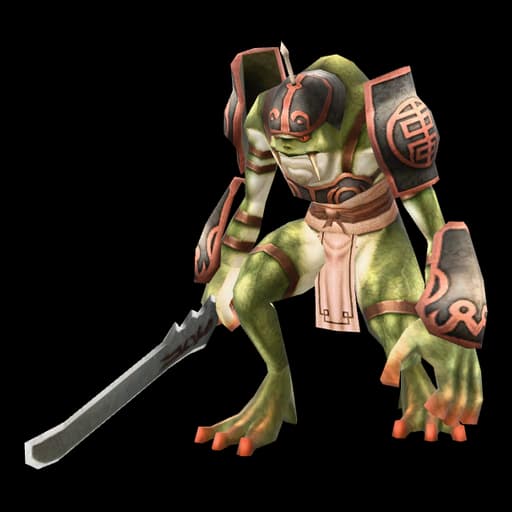
Arboreal frog soldier

Arboreal race

The arboreal race has been added to both bonuses and monsters. Many monsters that had no race, or already belonged to this type without a matching bonus, now join this race. You can prepare your equipment for the frog area and the many forests you will encounter later in your adventure.

Whatever your level, elemental and racial bonuses will play a much greater role in your progression on Gurgarath Resurgence.

04

Equipment, gloves and basic upgrading

Equipment has been fully reworked, giving you new choices to consider as you progress.

We have integrated base item stats, built-in bonuses, bonuses you can add and upgrade recipes into your character’s natural progression. The aim is to give every weapon its niche, reduce the impact other equipment can have on level 30 weapons and give every piece of equipment a purpose. To make progression more enjoyable, a level 32 item will never require materials you cannot obtain around your own level range.

For explanations of the changes made to each equipment category, select the ones that interest you under “Equipment family”!

256 equipment families

Sword+0

Required level 1

Available classes : Warrior · Ninja · Sura

Upgrade grade

Base stats

  • Attack value : 13–15
  • Magic attack value : 15–19
  • Attack Speed +20%

Equipment specialisations

  • Strong against Animals +3%

Refinement

Required materials
No material required

Next item

Sword+1

Required level 1

Yang cost
600
Success chance
100 %

Normal refinement can lower the item by one or two grades on failure.

05

Inventories and item organisation

Managing items is an integral part of your journey throughout the game, whether through your inventory, special inventories, storage or shop. To make things easier, we have prepared several pages and neatly organised special inventories. You will also have access to search, several sorting modes, the option to sort only the active page, and shortcuts to help you organise and move your items more easily. You will unlock more space as you progress.

Inventory

5 pages

Inventory (I)

15090208430580102

You have 5 pages of 45 slots, totalling 225. The first 2 are open from the start; later pages unlock with expansions.

Inventory Expansion

5 expansions for 5 slots
InventoryPage 1 / 5

90 / 225 slots unlocked

Special inventory

4 × 6 pages

Books

851508031061527303345

You have 4 clearly defined special inventory categories: Books, Materials, Stones & Chests. Each category has 6 pages of 45 slots, for a total of 270 per category. The first page is unlocked from the start.

Special Inventory Expansion

5 expansions for 5 slots
BooksPage 1 / 6

45 / 270 slots unlocked

Sorting follows the order defined for this category.

Drop or destroy

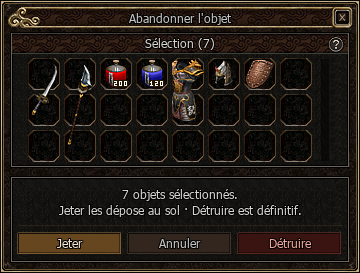
Multiple-item drop window with Drop, Cancel and Destroy actions.
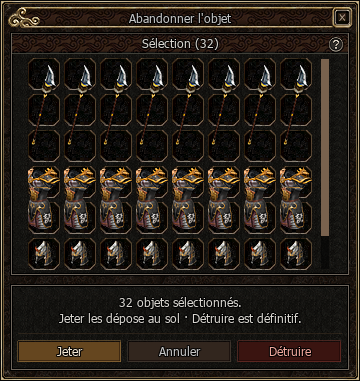
Expanded drop window with 32 selected items and a scrollbar.
The item drop window has been improved so you can drop or destroy several items at once. Add items by dragging them into the window or using Ctrl + click.

Everyday shortcuts

Split a stack, share an item in chat or look up its details without going through menus.

Shift + click
Split a stack
Alt + click
Insert an item link into chat
Shift + Alt + right-click
Open the item’s Wiki page
Ctrl + right-click
Quickly transfer to the open window
Ctrl + right-click
Open several chests
Shift + Alt + click
Open shop search for this item

Quick transfers also work with storage, shops and trades: the action depends on the window you have open.

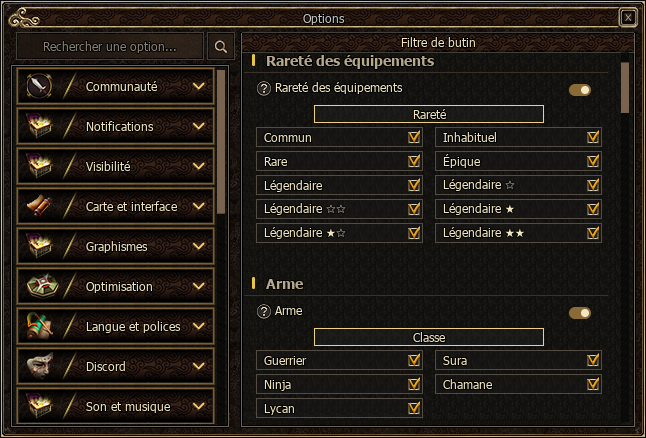
Loot filter

Loot filter options: equipment rarities from Common to starred Legendary ranks.

The loot filter lets you choose which items you want to pick up automatically. Select the categories that interest you and adjust your equipment preferences to suit your needs.

You can also customise the filter by item rarity and characteristics. Once you have made your choices, simply save your settings to use them.

Skill books can be filtered by class, with a Miscellaneous category as well. The Other items section also lets you select gift chests, polymorph items, crafting items and arrows separately.

And because a filter should never become a restriction, you can always pick up an item manually by clicking it, even if it does not match your criteria.

We designed this system to make things easier, keep you in control of your loot and avoid unnecessary frustration.

Prepare your equipment sets

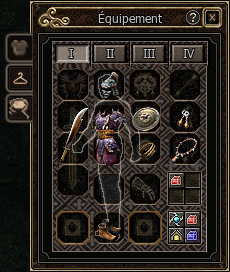
The equipment window is separate from the inventory and has four pages for preparing different sets. For example, you can keep one page for Orc farming, another for Mystics, one for dungeons and one for PvP. Additional pages must be unlocked before you can use them.

Once your sets are ready, clicking I, II, III or IV instantly switches your equipment and costume page. You can move from one preset to another without replacing each piece individually.

Using the same helmet or weapon in several sets? Ctrl + click an equipped item to link it to an empty slot on another unlocked page. The item stays on its original page and appears faded on the pages that use it. It is the same item, with the same bonuses.

Right-clicking a linked piece removes it from that page only. Removing the original item also removes all its links: you will need to set them up again if you want to share it again.

First equipment page, prepared for Orc farming.
I · Orc farming